How to Copy a Twitter Bookmark for AI Without Losing the Source
Most AI copy workflows are messy.
You select a tweet. The browser grabs half the surrounding UI. The assistant sees buttons, timestamps, repeated links, and not enough source context.
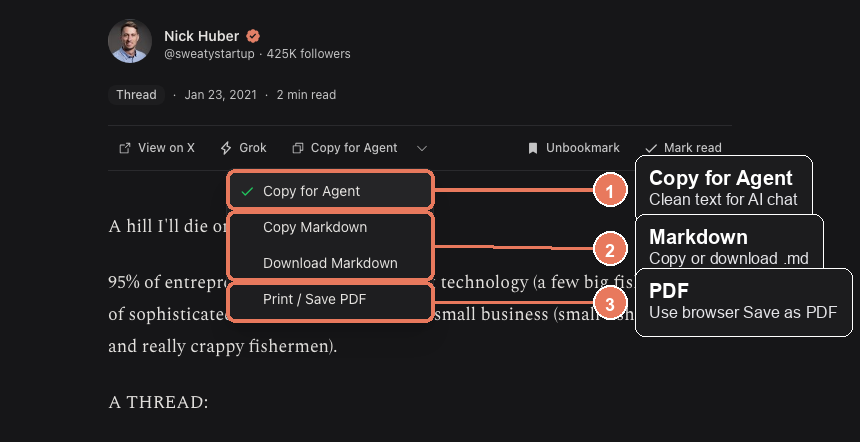
Totem’s Copy for Agent action exists for the narrower job: copy one saved post, thread, or article in a format that is easier to paste into an AI assistant.
Feeding saved bookmarks to AI is a live habit, not a hypothetical. In the last few months developers shipped an MCP server that exposes X bookmarks to Grok and other agents, a CLI that syncs bookmarks for local use, and Obsidian importers for chat exports. Those are setups — login, keys, a server. Copy for Agent is the one-click version: local, no account, one item at a time.
Step by step
- Open Totem from a new tab.
- Open the saved bookmark you want to use.
- Let the reader load the post. For threads, wait until the thread content appears.
- Click
Copy for Agentin the reader toolbar. - If
Copy for Agentis not the active button, click the small dropdown arrow and choose it from the menu. - Paste into your AI tool.
- Ask a specific question.
Good prompts start with the job:
Summarize this saved thread into 5 decision points. Keep links and source context.Turn this post into a checklist I can use while evaluating the idea.Extract the claims, assumptions, and open questions from this bookmark.What Copy for Agent includes
Copy for Agent keeps the material an assistant needs:
- the saved post or article text
- source URL
- author name and handle
- thread content when Totem has it
- useful media references where available
It removes some things that usually make AI context worse:
- repeated source links
- visual reader chrome
- noisy UI labels
- extra Markdown decoration meant for human reading
That is why it is different from selecting text manually.
The manual path is messy for a structural reason. X has no native bookmark export, and bookmarks are left out of the official account data archive. The v2 bookmarks API returns a flat list with no folders. So most people fall back to copying raw tweet UI by hand. Copy for Agent is the cleaner version of that fallback, one item at a time.
Copy for Agent vs Copy Markdown
Use Copy for Agent when you are pasting into an AI chat.
Use Copy Markdown when you want normal Markdown for a note, document, or editor.
Use Download Markdown when you want a file on disk.
Use Print / Save PDF when you want one bookmark as a document.
The whole-library ZIP also includes Markdown files, but Copy for Agent is faster when you are working with one saved item in the reader.
Copy Markdown fits an existing habit. People already pull AI-adjacent content into Obsidian or Notion as Markdown — there are community plugins built for exactly that. A saved post copied as clean Markdown drops into the same vault the same way.
Do not paste your whole library into an AI tool
Totem can export the library locally. That does not mean every bookmark should go into a third-party AI model.
Use the local search first. Open the one saved post or thread that matters. Then copy that item for the assistant.
Smaller context usually gives better answers, and it leaks less of your saved material into tools you do not control.
There is a mechanical reason too. Once a chat overflows its context window, the model silently drops the oldest messages — even ones you can still scroll up and see. Pasting a library buries the one post you cared about. Pasting that one post keeps it in view.
If copying fails
Clipboard permissions can be strict in some browsers.
Try this:
- Click inside the Totem tab once.
- Click
Copy for Agentagain. - If it still fails, open the dropdown and choose
Copy Markdown. - If clipboard access is blocked completely, use
Download Markdownand open the file locally.
The result is the same habit: search locally, open one saved thing, copy only what the next step needs.